file-loader与url-loader 这俩loader就是纸老虎,曾经老有面试问这俩loader的区别,每次都去记😂,其实只要看看他俩的源码就明白了。先来一个简单的例子
1 2 3 4 5 6 7 8 9 10 11 12 13 14 15 16 17 18 19 20 21 22 23 24 25 require ('@babel/register' )({ presets : ['@babel/preset-env' ] }); module .exports = { entry : './src/index.js' , module :{ rules :[ { test : /\.(png|jpe?g|gif)$/i , use : [ { loader : path.resolve (__dirname,'./src/loaders/file-loader/cjs.js' ) } ] } ] } } const imgUrl = require ('./images/test.png' )console .log ('imgUrl' ,imgUrl);
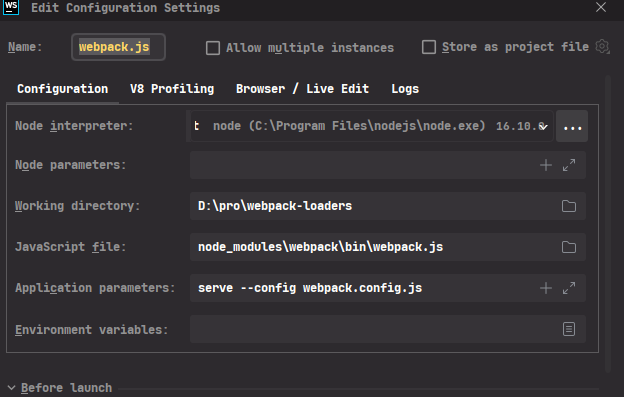
还需要配置一下debug环境,我用的是webstorm,其他ide同理,能调试node就能调试webpack-loader。
最后进入正文,在loader函数 这里打个断点,就可以看file-loader的执行过程了。
1
2
3
4
5
6
7
8
9
10
11
12
13
14
15
16
17
18
19
20
21
22
23
24
25
26
27
28
29
30
31
32
33
34
35
36
37
38
39
40
41
42
43
44
45
46
47
48
49
50
51
52
53
54
55
56
57
58
59
60
61
62
63
64
65
66
67
68
69
70
71
72
73
74
75
76
77
78
79
80
81
82
83
export default function loader (content ) { const options = getOptions (this ); validate (schema, options, { name : 'File Loader' , baseDataPath : 'options' , }); const context = options.context || this .rootContext ; const name = options.name || '[contenthash].[ext]' ; const url = interpolateName (this , name, { context, content, regExp : options.regExp , }); let outputPath = url; if (options.outputPath ) { if (typeof options.outputPath === 'function' ) { outputPath = options.outputPath (url, this .resourcePath , context); } else { outputPath = path.posix .join (options.outputPath , url); } } let publicPath = `__webpack_public_path__ + ${JSON .stringify(outputPath)} ` ; if (options.publicPath ) { if (typeof options.publicPath === 'function' ) { publicPath = options.publicPath (url, this .resourcePath , context); } else { publicPath = `${ options.publicPath.endsWith('/' ) ? options.publicPath : `${options.publicPath} /` } ${url} ` } publicPath = JSON .stringify (publicPath); } if (options.postTransformPublicPath ) { publicPath = options.postTransformPublicPath (publicPath); } if (typeof options.emitFile === 'undefined' || options.emitFile ) { const assetInfo = {}; if (typeof name === 'string' ) { let normalizedName = name; const idx = normalizedName.indexOf ('?' ); if (idx >= 0 ) { normalizedName = normalizedName.substr (0 , idx); } const isImmutable = /\[([^:\]]+:)?(hash|contenthash)(:[^\]]+)?]/gi .test ( normalizedName ); if (isImmutable === true ) { assetInfo.immutable = true ; } } assetInfo.sourceFilename = normalizePath ( path.relative (this .rootContext , this .resourcePath ) ); this .emitFile (outputPath, content, null , assetInfo); } const esModule = typeof options.esModule !== 'undefined' ? options.esModule : true ; return `${esModule ? 'export default' : 'module.exports =' } ${publicPath} ;` ; }
由于这个例子的options是空,所以省略了很多代码,这是省略后的file-loader
1
2
3
4
5
6
7
8
9
10
11
12
13
14
15
16
17
18
19
20
21
22
23
const options = getOptions (this );validate (schema, options, { name : 'File Loader' , baseDataPath : 'options' , }); const context = options.context || this .rootContext ;const name = options.name || '[contenthash].[ext]' ;const url = interpolateName (this , name, { context, content, regExp : options.regExp , }); let outputPath = url;let publicPath = `__webpack_public_path__ + ${JSON .stringify(outputPath)} ` ;this .emitFile (outputPath, content, null , assetInfo);const esModule = typeof options.esModule !== 'undefined' ? options.esModule : true ; return `${esModule ? 'export default' : 'module.exports =' } ${publicPath} ;` ;
这几行代码体现除了file-loader都干了些什么,其实关键点就两步,首先通过interpolateName编译name,然后通过this.emitFile把原始资源copy到dist,顺便把名字改成编译后的name,完了。
接下来看url-loader 这个代码更简。
1
2
3
4
5
6
7
8
9
10
11
12
13
14
15
16
17
18
19
20
21
22
23
24
25
26
27
28
29
30
31
32
33
34
35
36
37
38
39
40
41
42
43
44
45
46
47
48
49
50
51
52
53
54
export default function loader (content ) { const options = getOptions (this ) || {}; validate (schema, options, { name : 'URL Loader' , baseDataPath : 'options' , }); if (shouldTransform (options.limit , content.length )) { const { resourcePath } = this ; const mimetype = getMimetype (options.mimetype , resourcePath); const encoding = getEncoding (options.encoding ); if (typeof content === 'string' ) { content = Buffer .from (content); } const encodedData = getEncodedData ( options.generator , mimetype, encoding, content, resourcePath ); const esModule = typeof options.esModule !== 'undefined' ? options.esModule : true ; return `${ esModule ? 'export default' : 'module.exports =' } ${JSON .stringify(encodedData)} ` } const { loader : fallbackLoader, options : fallbackOptions, } = normalizeFallback (options.fallback , options); const fallback = require (fallbackLoader); const fallbackLoaderContext = Object .assign ({}, this , { query : fallbackOptions, }); return fallback.call (fallbackLoaderContext, content); }
上面那一大堆,关键步骤还是两点,一个是shouldTransform,一个是normalizeFallback。
shouldTransform,顾名思义,是否把文件转成base64。
1
2
3
4
5
6
7
8
9
10
11
12
13
14
15
function shouldTransform (limit, size ) { if (typeof limit === 'boolean' ) { return limit; } if (typeof limit === 'string' ) { return size <= parseInt (limit, 10 ); } if (typeof limit === 'number' ) { return size <= limit; } return true ; }
从代码来看,limit可以直接是true/false,或者是字符串或者数字,如果是字符串会调parseInt转成数字,逻辑都一样 size <= limit。
如果满足shouldTransform,会调用getEncodedData把文件转成base64。
接下来是normalizeFallback
normalizeFallback 看到没有函数内第一行let loader = ‘file-loader’;
1
2
3
4
5
6
7
8
9
const fallback = require (fallbackLoader); const fallbackLoaderContext = Object .assign ({}, this , { query : fallbackOptions, }); return fallback.call (fallbackLoaderContext, content);
完了,所以这俩的区别就是url-loader内部会根据limit的值决定直接把文件转成base64还是直接调用file-loader。
sass-loader、css-loader、style-loader sass-loader 源码
1
2
3
4
5
6
7
8
9
10
11
12
13
14
15
16
17
18
19
20
21
22
23
24
25
26
27
28
29
30
31
32
33
34
35
36
37
38
39
40
41
42
43
44
45
46
47
48
49
50
51
52
53
54
55
56
57
58
59
60
61
62
63
64
65
66
67
68
69
70
71
72
73
74
75
76
77
78
79
80
81
82
83
84
85
86
87
88
89
90
91
92
async function loader (content ) { const options = this .getOptions (schema); const callback = this .async (); const implementation = getSassImplementation (this , options.implementation ); if (!implementation) { callback (); return ; } const useSourceMap = typeof options.sourceMap === "boolean" ? options.sourceMap : this .sourceMap ; const sassOptions = await getSassOptions ( this , options, content, implementation, useSourceMap ); const shouldUseWebpackImporter = typeof options.webpackImporter === "boolean" ? options.webpackImporter : true ; if (shouldUseWebpackImporter) { const isModernAPI = options.api === "modern" ; if (!isModernAPI) { const { includePaths } = sassOptions; sassOptions.importer .push ( getWebpackImporter (this , implementation, includePaths) ); } else { sassOptions.importers .push ( getModernWebpackImporter (this , implementation) ); } } const compile = getCompileFn (implementation, options); let result = await compile (sassOptions, options) let map = result.sourceMap ? result.sourceMap : result.map ? JSON .parse (result.map ) : null ; if (map && useSourceMap) { map = normalizeSourceMap (map, this .rootContext ); } if (typeof result.loadedUrls !== "undefined" ) { result.loadedUrls .filter ((url ) => url.protocol === "file:" ) .forEach ((includedFile ) => { const normalizedIncludedFile = url.fileURLToPath (includedFile); if (path.isAbsolute (normalizedIncludedFile)) { this .addDependency (normalizedIncludedFile); } }); } else if ( typeof result.stats !== "undefined" && typeof result.stats .includedFiles !== "undefined" ) { result.stats .includedFiles .forEach ((includedFile ) => { const normalizedIncludedFile = path.normalize (includedFile); if (path.isAbsolute (normalizedIncludedFile)) { this .addDependency (normalizedIncludedFile); } }); } callback (null , result.css .toString (), map); }
所有,简单说,如果忽略处理@import与source-map的逻辑,sass-loader所做的事,就是先选择合适的sass解析器,然后编译sass文件把结果传给下一个loader。
css-loader 源码
这个loader首先会有一堆处理plugin的逻辑,我们这里不关注plugin,直接从155 行开始看。
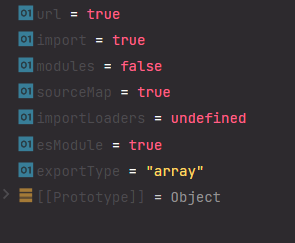
由于options.url与options.import是true,所以155行的plugin是个长度为2的数组,这里会调用postcss处理这个plugin,主要处理css文件里的@import与url相关。
这里假设没有错误,也没有warning,剩下的那一堆代码细节先不管,直接跳到最后一行,最后一行callback了一个经过拼接的字符串,我们可以把这个字符串log出来:
1 2 3 4 5 6 7 8 9 10 import ___CSS_LOADER_API_NO_SOURCEMAP_IMPORT___ from "./loaders/css-loader/runtime/noSourceMaps.js" ;import ___CSS_LOADER_API_IMPORT___ from "./loaders/css-loader/runtime/api.js" ;var ___CSS_LOADER_EXPORT___ = ___CSS_LOADER_API_IMPORT___ (___CSS_LOADER_API_NO_SOURCEMAP_IMPORT___);___CSS_LOADER_EXPORT___.push ([module .id , ".container {\n max-width: 960px;\n margin: 0 auto;\n padding: 20px;\n background-color: #fff;\n border-radius: 4px;\n box-shadow: 0 0 10px rgba(0, 0, 0, 0.1); }\n .container h1 {\n color: #007bff;\n font-size: 36px;\n text-align: center; }\n" , "" ]); export default ___CSS_LOADER_EXPORT___;
从这里可以看到,css-loader把css转换成了可运行的js,转换后的css则通过字符串的形式放在___CSS_LOADER_EXPORT___这个变量上,最后导出___CSS_LOADER_EXPORT___。
这个文件站在使用者的角度上来看没什么意义,css嘛,要么通过link标签引入,要么通过style插入到head里。如果是前者,loader是做不到了,因为loader的作用仅仅是把各种文件转换成可运行的js,这个功能可以用mini-css-extract-plugin,这个插件会在打包过程中拿到css文件的路径,然后在打包结束通过link标签把css插入html,需要配合htmlwebpackplugin使用。如果是后者,可以使用style-loader。
style-loader 源码
这个loader的入口是一个pitch函数,我们知道webpack loader是从右往左执行的
1
2
3
4
5
6
7
8
{ rules :[ { test : /\.scss$/ , use :['style-loader' ,'css-loader' ,'sass-loader' ] } ] }
假如你的webpack配置长这样,如果没有pitch函数,应该从右往左,即sass-loader css-loader style-loader,如果三个loader都有pitch函数,执行顺序变成这样,style-loader-pitch css-loader-pitch sass-loader-pitch sass-loader css-loader style-loader,如果在这条代码链的执行过程中,有某一个loader的pitch返回了一个值,后面loader的代码就不执行了。
回到真实情况,这里的style-loader-pitch返回了值,所以只会执行style-loader-pitch与style-loader。
这个pitch函数大多数逻辑我们并不需要关注,我仅仅想知道它是如何把css插入dom的(我很懒)。所以只需要关注这个loader最后返回了什么东西,下面是我通过debugger提取出来syle-loader最后生成的东西。
1
2
3
4
5
6
7
8
9
10
11
12
13
14
15
16
17
18
19
20
21
22
23
24
25
26
27
28
29
30
31
32
33
34
35
36
37
38
39
40
41
42
43
44
45
46
47
48
49
50
51
52
53
54
55
56
57
58
59
60
61
62
63
64
65
66
67
68
69
70
71
72
73
74
75
76
77
import API from "!./loaders/style-loader/runtime/injectStylesIntoStyleTag.js" ;import domAPI from "!./loaders/style-loader/runtime/styleDomAPI.js" ;import insertFn from "!./loaders/style-loader/runtime/insertBySelector.js" ;import setAttributes from "!./loaders/style-loader/runtime/setAttributesWithoutAttributes.js" ;import insertStyleElement from "!./loaders/style-loader/runtime/insertStyleElement.js" ;import styleTagTransformFn from "!./loaders/style-loader/runtime/styleTagTransform.js" ;import content, * as namedExport from "!!./loaders/css-loader/index.js!./loaders/sass-loader/index.js!./style.scss" ;var options = {};options.styleTagTransform = styleTagTransformFn; options.setAttributes = setAttributes; options.insert = insertFn.bind (null , "head" ); options.domAPI = domAPI; options.insertStyleElement = insertStyleElement; var update = API (content, options);if (module .hot ) { if (!content.locals || module .hot .invalidate ) { var isEqualLocals = function isEqualLocals (a, b, isNamedExport ) { if (!a && b || a && !b) { return false ; } var p; for (p in a) { if (isNamedExport && p === "default" ) { continue ; } if (a[p] !== b[p]) { return false ; } } for (p in b) { if (isNamedExport && p === "default" ) { continue ; } if (!a[p]) { return false ; } } return true ; }; var isNamedExport = !content.locals ; var oldLocals = isNamedExport ? namedExport : content.locals ; module .hot .accept ( "!!./loaders/css-loader/index.js!./loaders/sass-loader/index.js!./style.scss" , function ( if (!isEqualLocals (oldLocals, isNamedExport ? namedExport : content.locals , isNamedExport)) { module .hot .invalidate (); return ; } oldLocals = isNamedExport ? namedExport : content.locals ; update (content); } ) } module .hot .dispose (function ( update (); }); } export * from "!!./loaders/css-loader/index.js!./loaders/sass-loader/index.js!./style.scss" ;export default content && content.locals ? content.locals : undefined ;
这一段代码会在浏览器里执行,主要是这一句
1 var update = API (content, options);
这里的API来自这里 ,执行API的过程中,会调用modulesToDom ,接着是addElementStyle ,这个函数的前两句完成了把css通过style标签插入到dom中的任务。
1
2
3
4
5
6
function addElementStyle (obj, options ) { const api = options.domAPI (options); api.update (obj); }
这里的domAPI来自这儿 ,首先通过options.insertStyleElement生成styleElement(这里会生成一个空的style标签),然后在update函数内部调用了apply函数,apply函数首先通过一系列条件对传进来的css进行字符串拼接,这里不是重点,关键是最后:
1 options.styleTagTransform (css, styleElement, options.options );
styleTagTransform
代码很简单,我们这里只会命中``styleElement.appendChild(document.createTextNode(css));`这一句。
但是有个问题,style-loader的pitch函数返回了值,后面的loader不执行了,那是怎么把sass代码转换成css的,注意看上面style-loader的返回值里面有这么一句:
1 import content, * as namedExport from "!!./loaders/css-loader/index.js!./loaders/sass-loader/index.js!./style.scss" ;
webpack会解析这个import(带有感叹号的会忽略),然后在import的过程中会执行sass-loader、css-loader。
babel-loader vue-loader